Protecting broker API keys on Linux means controlling what each credential can do, which processes can read it, and how quickly you can revoke it. Keeping a token out of a Python script is a start. It is not the whole job.
A practical setup separates account passwords from application credentials, keeps live trading secrets away from development tools, and delivers credentials only to the process that needs them. This guide covers that security layer; use the broader guide to setting up Python for algorithmic trading on Linux for the surrounding development environment.
Restrict API Permissions Before Choosing Storage
Start at the broker’s credential settings. A securely stored token with unnecessary permissions still creates unnecessary exposure. Apply the least privilege principle: give each application only the access required for its task, and maintain separate credentials for unrelated applications. This follows the access control approach in the OWASP secrets management guidance.
A reporting dashboard should not receive order permissions simply because the same account also runs an execution bot. Separate development, paper trading and live trading credentials wherever the provider supports that separation. Confirm the actual permissions rather than trusting a label such as “standard API access.”
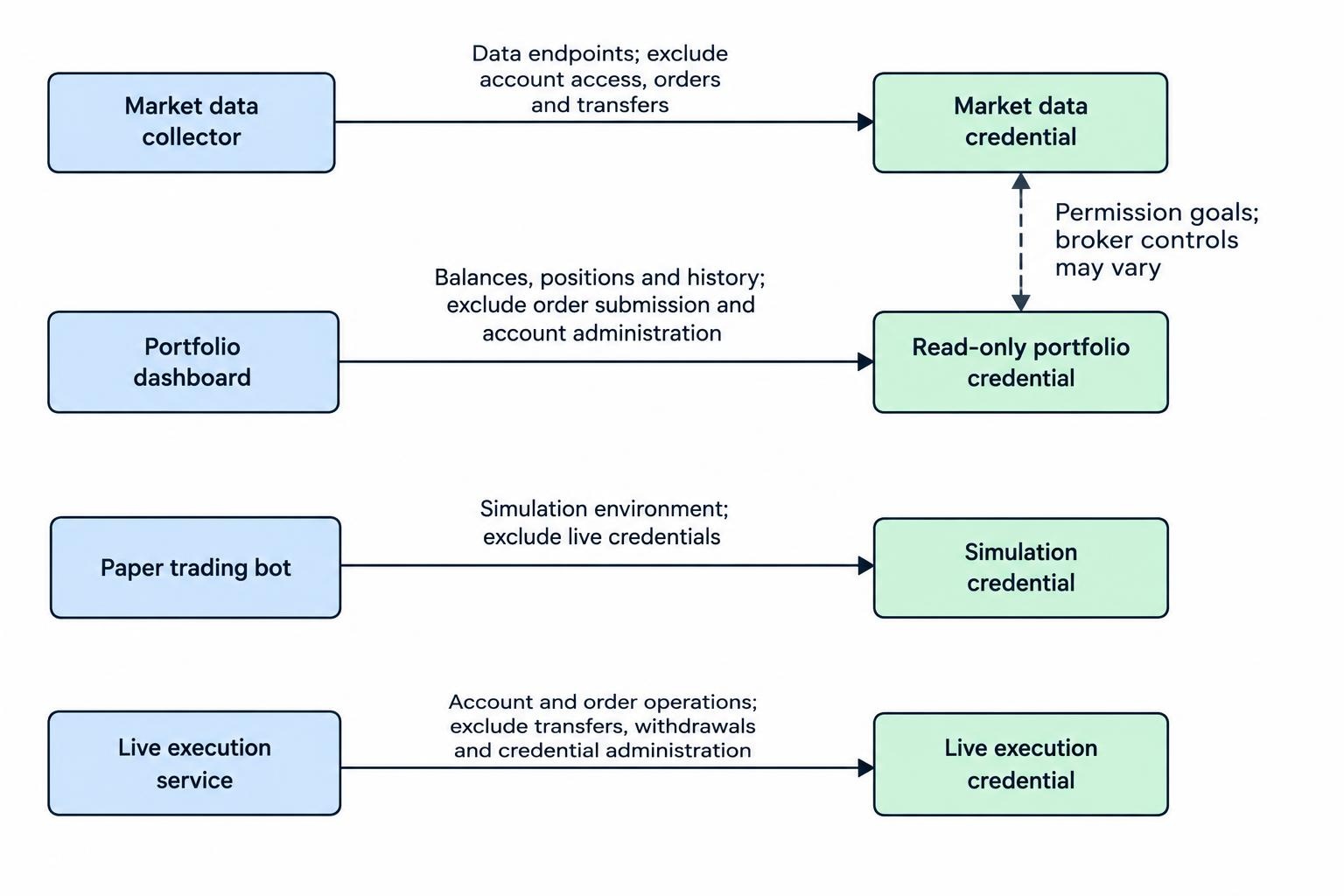
| Application | Access to request | Access to avoid unless required |
|---|---|---|
| Market data collector | Required data subscriptions and endpoints | Account access, orders and transfers |
| Portfolio dashboard | Required balances, positions and history | Order submission and account administration |
| Paper trading bot | Documented simulation environment | Live account credentials |
| Live execution service | Required account and order operations | Transfers, withdrawals and credential administration |
These are permission goals, not a promise that every broker offers matching controls. Where available, consider account restrictions, credential expiry and allowed source IP addresses. Check how each restriction behaves before depending on it, particularly if your internet connection or hosting address changes.
Do not treat “withdrawals disabled” as harmless access. Order permissions still authorize changes to the account. Read access also deserves protection because balances, positions and transaction history are private information.
Protect the Account That Issues the Credentials
Secure the broker login and its recovery email before creating application credentials. Use a different generated password for each account, store passwords in a password manager, and enable multifactor authentication where supported. These measures are covered in NIST’s password and account authentication guidance.
Keep the distinction between login security and API security clear. Check whether the broker’s API requires separate authentication controls; do not assume the second factor used in your browser also protects requests made with a stolen API token.
Store recovery codes securely and retain a recovery route that does not depend entirely on the trading computer. A lost laptop should not also mean losing the ability to revoke its credentials.
Use the documented application authentication method. Do not give a bot your main account password simply to avoid setting up the supported API flow. Protect refresh tokens and private signing material alongside API secrets, and treat the complete credential set as confidential unless the provider explicitly identifies a component as public.
Choose Credential Storage for the Way the Application Runs
An application started manually on a desktop has different requirements from a service that starts before anyone logs in. Choose storage around that distinction. Avoid building an unattended service around a password prompt that nobody will be present to answer.
Desktop Applications and Python Keyring
For an interactive desktop application, Python’s keyring library can connect to a supported credential backend, such as Secret Service or KWallet. Verify the selected backend rather than assuming that installing the library creates secure storage. The Python keyring documentation describes backend selection, session requirements and potentially insecure alternative backends.
Test retrieval after logging out, restarting and locking the credential store. A script working inside an unlocked desktop session does not prove that a scheduled job can retrieve the same secret. If retrieval fails, stop with a clear error rather than falling back to a plaintext copy.
Also review the backend’s access controls. Do not assume that every application receives a separate approval prompt whenever it requests a stored credential.
Protected Files and the Limits of Environment Variables
A protected file outside the project directory can be a straightforward option for a small deployment. Use restrictive ownership and permissions: an owner controlled directory with mode 0700 and an owner readable and writable secret file with mode 0600 are common starting points. Verify access control lists and parent directory permissions too.
The owner must match the intended access model. A file read directly by the bot needs to be accessible to its account; a file read by a privileged service manager need not be. The guide to Linux file permissions and ownership covers those mechanics.
A .env file remains a plaintext file. Its name does not encrypt it, prevent synchronization or exclude it from backups. If you use one during development, keep it outside shared folders, exclude it from version control before adding credentials, and check what your editor or backup application copies.
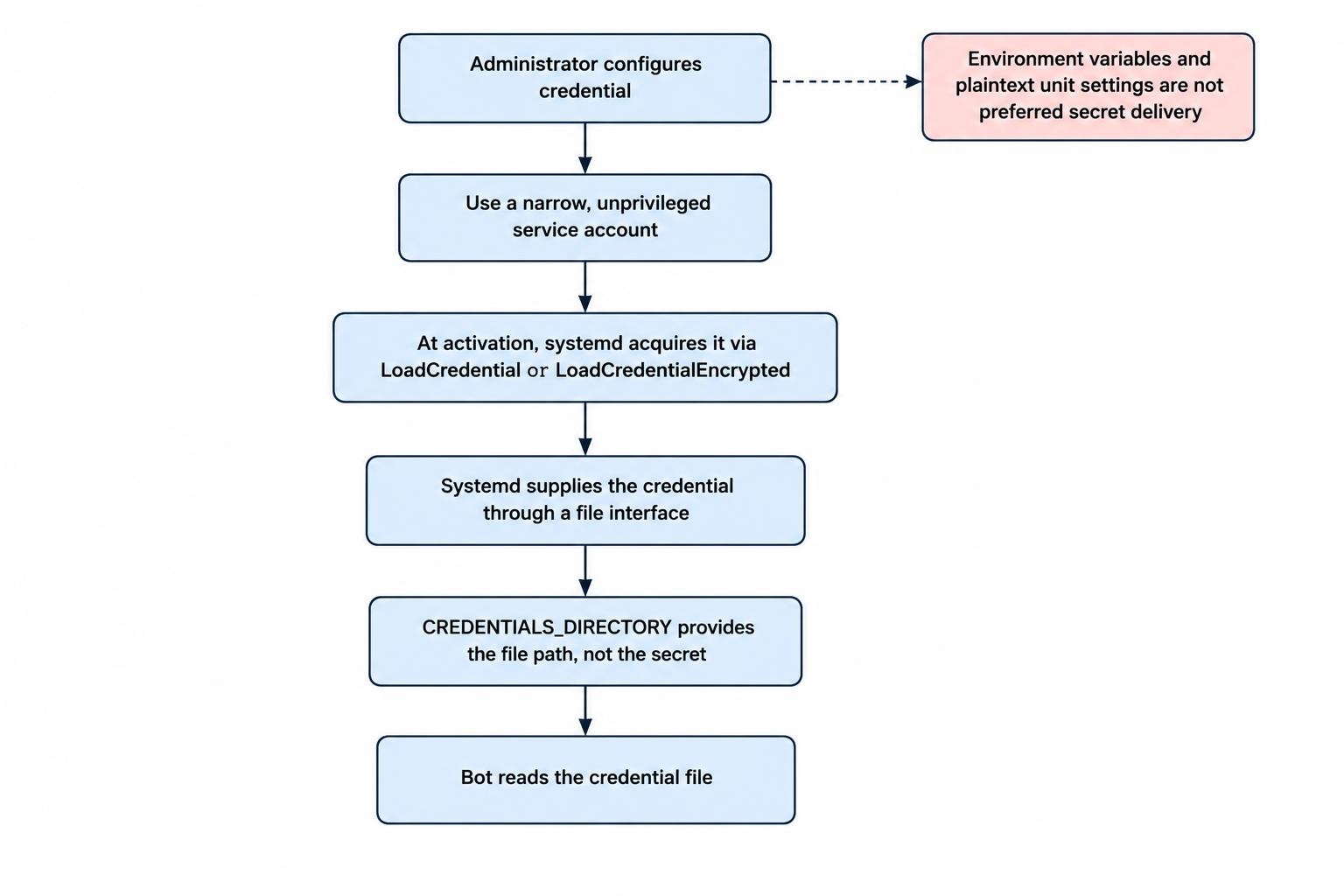
Environment variables are also not a secret vault. They can be inherited by child processes, and systemd explicitly warns against using them to pass secrets to services. Prefer a credential delivery mechanism rather than embedding tokens in unit environment settings; the systemd execution environment documentation covers this warning and the credential alternatives.
Unattended Services and systemd Credentials
For a bot managed by systemd, consider its credential mechanism. LoadCredential supplies credential data through a file interface, while LoadCredentialEncrypted accepts an encrypted credential and decrypts it before delivery. The application locates its credential files through CREDENTIALS_DIRECTORY; that variable contains a path, not the secret itself.
Credentials are acquired at service activation and remain immutable during that service run. Encrypted credentials can use host or TPM backed protection, depending on configuration. Plan deployment and recovery around those choices, using the systemd service credentials documentation for their behavior.
The bot must read the supplied file rather than expect a token embedded in its configuration. Check which features your distribution’s installed systemd version supports. Avoid placing plaintext secrets in unit files, including literal credential settings intended for nonsensitive values.
Credential delivery does not make the consuming application trustworthy. Keep the service account narrow and test its startup, shutdown and restart behavior. The guide to managing Linux services with systemd covers the surrounding service administration.
Separate the Trading Process From Everyday Work
Run an unattended bot under a dedicated, unprivileged account rather than your normal desktop account or root. Do not grant it sudo access just to simplify installation. Give it access to its required credentials, configuration and state directories, not your entire home directory.
Separate application code from writable runtime data where practical. Review who can modify the application, its dependencies and its startup configuration, not just who can read the secret file. These boundaries belong in your Linux user, group and sudo configuration.
Keep live credentials out of exploratory notebooks, unfamiliar trading packages and development sessions used to test downloaded code. Make dependency changes in an environment without live account access, then deploy reviewed changes to the execution service. A trading credential is a poor substitute for a software review process.
If you package the application in a container, supply credentials at runtime rather than copying them into the image or build context. Review mounted directories and the container’s host access as part of deployment. The guide to Docker and Podman on Linux covers the container workflow without turning the image into a credential archive.
For a remotely hosted bot, restrict administrative access separately from broker access. Use SSH keys and access controls, and avoid copying broker secrets into terminal commands during remote setup.
Schedule maintenance for the operating system, Python runtime and dependencies. Test updates before returning the service to normal operation, and define how pending orders and restarts are handled during that window. Establish a routine for Linux security updates and automatic patching rather than leaving an unattended machine untouched indefinitely.
Keep Secrets Out of Logs, Repositories and Support Messages
Design logs around a small set of approved fields: timestamps, operation names, response status, internal request identifiers and a nonsecret credential label. Do not record authorization headers, passwords, access tokens or complete configuration objects. The OWASP logging guidance on sensitive data identifies these categories for exclusion or protected handling.
Test error paths with dummy credentials. Authentication failures, failed requests and unexpected exceptions deserve attention because that is when debugging output tends to become verbose. Inspect terminal output, application logs, notebook output and any remote error reporting destination.
When investigating a service, review what gets collected before sharing diagnostics. The guide to troubleshooting with journalctl covers journal access; exported logs still need a separate check for confidential content.
Keep repository examples free of working credentials. Use clearly invalid sample values and configuration templates containing field names only. Add secret scanning to the development workflow where practical, but review staged changes yourself before committing. A scanner passing is not proof that every credential format was recognized.
Do not paste live credentials into support tickets, chat messages, screenshots or AI coding tools. Share sanitized errors and request identifiers instead. Inspect screenshots for account details as well as tokens; cropping out a password field does not necessarily remove everything worth protecting.
Keep API Connections Authenticated
Use the provider’s documented HTTPS endpoints and leave certificate verification enabled. In Python Requests, disabling verification accepts invalid certificates and ignores hostname mismatches, exposing the connection to interception. The Requests documentation on certificate verification describes that behavior and support for configured certificate authorities.
If verification fails, investigate the system clock, trust store, endpoint hostname and any intercepting proxy. Do not turn off verification to make the error disappear. That fixes the warning by removing the check, which is not much of a repair.
Keep secrets out of URLs unless the documented protocol requires them there. Before enabling HTTP debugging or routing traffic through a development proxy, inspect what it records. Use a sandbox credential for diagnosis rather than allowing a troubleshooting session to collect live authentication data.
Plan Rotation and Recovery Before They Are Needed
Maintain a small credential inventory without storing secret values in it. Record the application, account, permissions, deployment location, creation date, expiry where applicable, and revocation procedure. Give credentials recognizable administrative names so that you can identify the right one during an incident.
For planned rotation, establish whether the provider permits overlapping credentials. If it does, prepare the replacement, update the consumer, verify a harmless authenticated operation, and revoke the old credential. If overlap is unavailable, plan a controlled interruption. Confirm that the running process actually loaded the replacement rather than continuing with an old in-memory value.
Protect stored credentials and recovery material with encryption where appropriate, but distinguish storage protection from runtime access. Encryption does not replace permissions after data becomes available to the running system. The Linux kernel’s filesystem encryption threat model makes that boundary explicit.
Decide whether credentials need backing up or can instead be reissued through a secure recovery process. Encrypt backups containing secrets, restrict access to the decryption material, and test recovery without connecting a restored bot to a live account. Include this in your offsite backup and recovery testing.
After restoring an old system image, check credential status and service activation before allowing the bot to start. Restoring a machine should not accidentally restore permission to trade.
What to Do After a Credential Leak
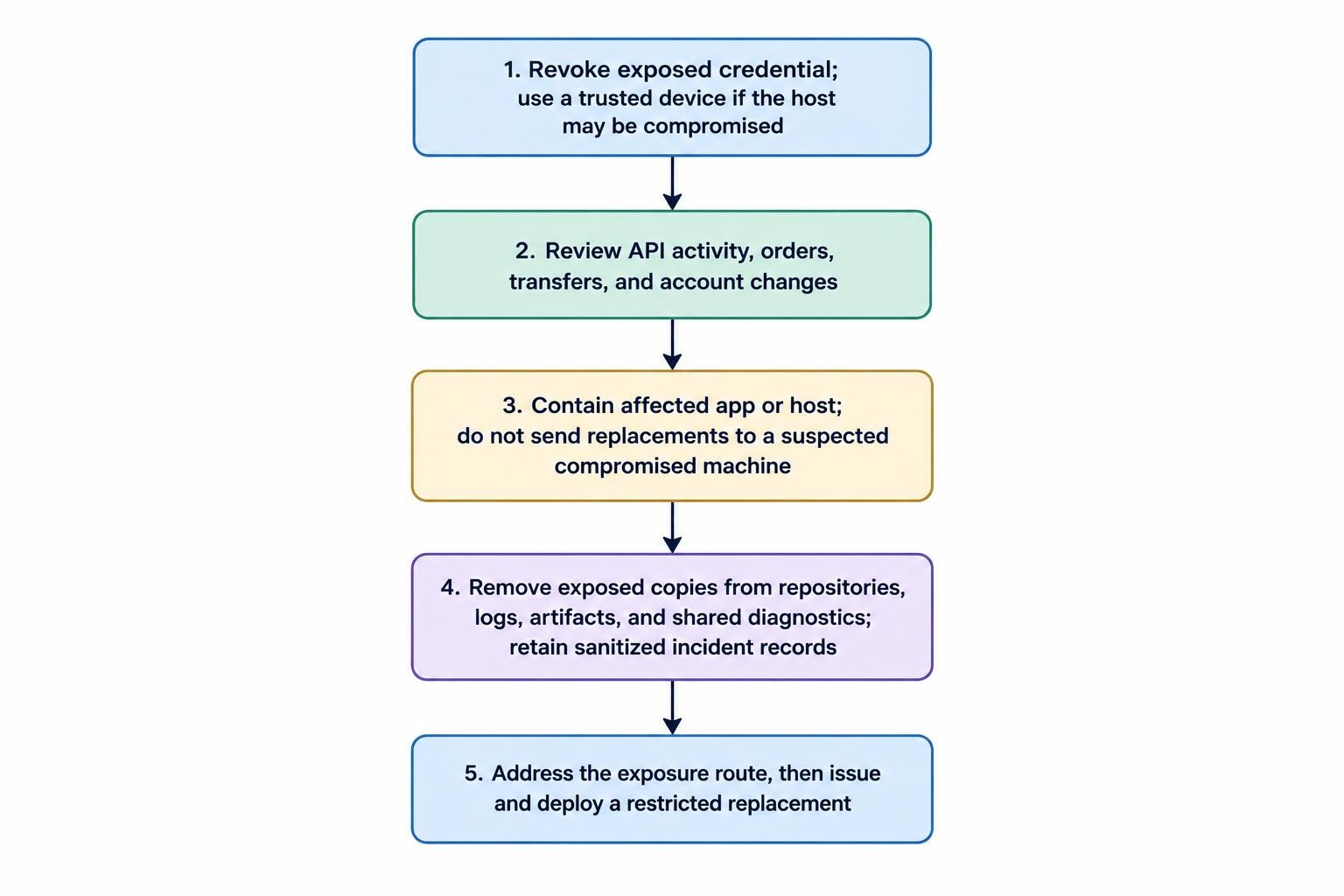
Treat a working credential published in a repository or other uncontrolled location as exposed. Revoke it before spending time cleaning up the files. Removing a secret from the latest commit does not remove copies from history, forks or other clones; GitHub’s sensitive data removal procedure puts revocation or rotation before repository cleanup.
- Revoke the exposed credential. Use a trusted device if the trading host may be compromised.
- Review account activity. Inspect API activity, orders, transfers and account setting changes, and contact the provider about unauthorized activity.
- Contain the affected application or host. Do not deliver replacement secrets to a machine you still suspect is compromised.
- Remove exposed copies. Address repositories, logs, artifacts and shared diagnostics while preserving sanitized incident records.
- Issue a restricted replacement. Deploy it only after addressing the route that caused the exposure.
Do not assume revocation cancels existing orders or changes positions. Review account state separately through a trusted interface. If the main login, recovery email or host administration credentials were also exposed, handle those as separate compromises.
Test the Setup Before Enabling Live Access
Perform a dry run with dummy credentials or the provider’s simulation environment. Restart the machine, confirm that the intended service can retrieve its credential, and verify that unrelated accounts cannot read the stored secret. Missing credentials should produce a controlled failure, not an automatic fallback to another account.
Inspect output after both successful and failed requests. Test credential replacement and revocation, then check that backups and deployment artifacts contain only what you intended. Only after these checks should the service receive its required live permissions. The objective is practical: fewer copies of each secret, less authority attached to each copy, and a recovery process you can carry out under pressure.